Product Search:
 |
Product Categories:
|
Hot Sell Batteries:
|
|
|
|
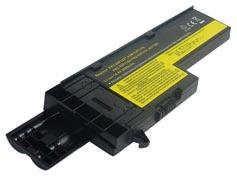
Laptop Battery for IBM 40Y6999, 40Y7001, 40Y7003, 42T4630, 92P1168, ASM 92P1170, FRU 42T4505, FRU 92P1163, FRU 92P1165, FRU...
|


Email a Friend Ask Questions Add to Favorites |
| Product Code: |
KEBENIB050 |
| Type: |
Li-ion |
| Volt: |
14.4V (Compatible with 14.8V) |
| Capacity: |
2200mAh |
| Weight: |
228g |
| Color: |
Black |
| Dimension: |
209.55 x 59.95 x 23.59mm |
| Condition: |
New, 1 Year Warranty! |
|
Original Price: £30.50
Special Price: £21.35 (inc. VAT)
Inventory: In Stock
|
|
|
Please ensure the battery that you are going to buy fits your laptop's brand, model number and battery's part number.
Please press 'Ctrl+F' to search for your part number/machine model.
This laptop battery can replace the following part numbers:
IBM
| 40Y6999 |
40Y7001 |
40Y7003 |
42T4630 |
92P1168 |
| ASM 92P1170 |
FRU 42T4505 |
FRU 92P1163 |
FRU 92P1165 |
FRU 92P1167 |
| FRU 92P1169 |
FRU 92P1171 |
FRU 92P1173 |
FRU 92P1227 |
FRU 93P5027 |
| FRU 93P5028 |
|
|
|
|
This laptop battery is also compatible with the following models:
IBM
| ThinkPad X60 1706 |
ThinkPad X60 1707 |
ThinkPad X60 1708 |
ThinkPad X60 1709 |
ThinkPad X60 2509 |
| ThinkPad X60 2510 |
ThinkPad X60 Series |
ThinkPad X60s 1702 |
ThinkPad X60s 1703 |
ThinkPad X60s 1704 |
| ThinkPad X60s 1705 |
ThinkPad X60s 2507 |
ThinkPad X60s 2508 |
ThinkPad X60s 2522 |
ThinkPad X60s 2524 |
| ThinkPad X60s 2533 |
ThinkPad X60s Series |
|
|
|
LENOVO
| ThinkPad X61 7673 |
ThinkPad X61 7674 |
ThinkPad X61 7675 |
ThinkPad X61 7676 |
ThinkPad X61 7678 |
| ThinkPad X61 7679 |
ThinkPad X61 Series |
ThinkPad X61s series |
ThinkPad X61s 15th Anniversary Edition |
ThinkPad X61s 7666 |
| ThinkPad X61s 7667 |
ThinkPad X61s 7668 |
ThinkPad X61s 7669 |
ThinkPad X61s 7670 |
ThinkPad X61s 7671 |
|
Any Battery or accessory you purchase from our website is guaranteed:
Full 1 year warranty, 30 days money back!
All batteries are made with high quality cells.
100% brand new and original manufacturer compatible.
Shopping with us is 100% secure guaranteed!
Laptop Battery Tips:
1. Please read the manufacturer's manual about the laptop battery carefully.
2. Do remember to charge your laptop battery fully after receiving it because batteries may discharge during storing and shipping.
3. Do keep laptop battery clean by a clean soft cloth, pencil eraser, or rubbing alcohol.
4. Do not try to modify or disassemble the laptop batteries pack.
5. Do not incinerate or expose battery to excessive heat.
6. Do not place the battery in device for a long period of time if device is not being used.
7. Do not short circuit the batteries pack terminals or store your battery pack with metal objects.
|
|
|
|


